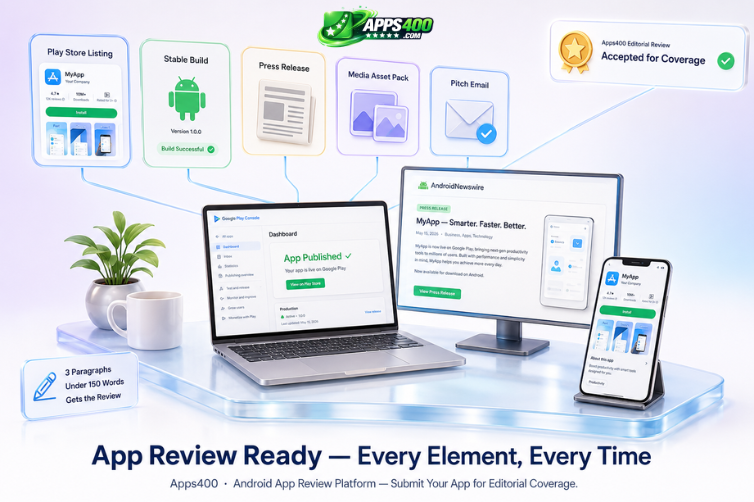
Every week, hundreds of Android apps publish to the Play Store. A fraction of them get reviewed. The rest disappear into the catalogue without a single editorial mention, a backlink, or a coverage spike that moves the download counter.
The difference is rarely app quality. There are genuinely good apps that never get a single review, and objectively mediocre apps that get covered by six outlets in their first week. The difference – consistently, across every category we cover – is whether the developer made the app review-ready at launch before they reached out to anyone.
As a platform that reviews Android apps across productivity, utilities, lifestyle, and entertainment, we see both sides of this clearly. Here is an honest breakdown of what separates apps that get covered from apps that do not – and what every developer needs to prepare before sending a single pitch email.
1. A Functioning, Stable Build That Respects the Reviewer’s Time
This sounds obvious. It is not always practised.
Reviewers need a build that installs cleanly, runs without crashes on a standard Android device, and demonstrates the core feature loop within the first two minutes of use. If your app requires a workaround to test, a special invite code that consistently fails to activate, or a backend that is not fully live yet – you are not ready for review. You are asking a reviewer to do your QA work for you, which they will not do. They will move to the next app in their queue.
The minimum viable review build includes:
- A publicly available Play Store listing – even Early Access is acceptable if the build is stable
- A working free tier or a reviewer promo code that activates correctly the first time
- No mandatory account creation gate blocking access to the main feature – let the reviewer see what the app does before asking them to register
- Tested and confirmed working on at least Android 10 and Android 13, covering the widest realistic device range
If you are sending a direct APK file rather than a Play Store link, explain clearly why in your outreach message. Reviewers are cautious about sideloaded files and the majority will not install one without a specific, credible reason. “Play Store listing is still pending review” is a valid reason. No explanation is not.
Apps that arrive in our submission queue with a clean, stable build that we can test in five minutes get to the review stage. Apps that require three emails to clarify how to access the core feature do not.
2. A Play Store Listing That Does the First Impression Work
Your Play Store listing is the first thing a reviewer checks – before your pitch email, before your press release, before anything else. They open the listing, spend 15 to 20 seconds assessing it, and form an immediate impression of whether the developer has invested seriously in this product or not. A weak listing raises questions about the app itself, even when the app is strong.
A review-ready Play Store listing includes every one of the following without exception:
- A clear, jargon-free description that explains what the app does in the first two sentences – not what inspired you to build it, not a list of technical achievements, but what the app does for the person who downloads it
- A feature graphic that communicates the app’s purpose visually. Not just your logo centred on a coloured rectangle – something that tells a person what they are going to get before they read a word
- At least four screenshots showing real UI from the actual app – not marketing mockups, not illustrated concept art, not what you wish the UI looked like. What it actually looks like when someone installs it today
- An honest and specific “What’s New” changelog – “Bug fixes and performance improvements” tells a reviewer nothing. “Fixed crash on Android 14 when switching between tabs, improved offline sync speed by 40%” tells them you are paying attention to your product
- A privacy policy URL that loads correctly – a broken privacy policy link is a rejection signal at every review platform and at Google itself
Reviewers screenshot your listing for the articles they write. Every element of that listing – the icon, the feature graphic, the first screenshot – appears in the published review. Make every element worth screenshotting. If you want to understand the standard we hold Android app listings to when we review Android apps, browse our recent coverage and look at the listings of apps that received strong reviews versus those that received mixed ones. The pattern is consistent.
3. A Published Press Release That Establishes the Launch as a Real Event
This is the single most skipped step in every developer’s launch preparation. It is also the one that makes the biggest difference to whether a reviewer takes your outreach seriously.
A press release gives a reviewer everything they need to write about your app without playing 20 questions over email. It establishes the launch as a real event rather than a passive Play Store upload. It provides context that a Play Store listing cannot: who built this, why it was built, what specific problem it solves, who the intended user is, and what makes it different from the other apps in its category. That context is what reviewers turn into editorial narrative – and editorial narrative is what gets published.
More importantly, a press release that is already published and indexed on a dedicated platform sends a signal before the review even begins. When a reviewer sees that your app has already been covered on AndroidNewswire – a dedicated press and distribution platform for Android app developers that also offers an app launch service covering press release writing, distribution, and outreach sequencing – it raises the app’s perceived legitimacy immediately. It signals that other people in the Android ecosystem have already registered this launch as significant. That third-party validation is worth more than any amount of self-promotion in a pitch email.
If you have not written a press release, write one before you pitch any reviewer. It does not need to be long. Cover the essentials: app name, developer name, what it does, three to five key features, pricing, Play Store link, and one quote from the developer about why they built it. Keep it under 500 words. Publish it on at least one indexed platform before you begin outreach. A press release published the same day as your reviewer pitch is less effective than one published a week earlier that has already been indexed and linked to.
4. A Media Asset Pack at a Permanent, Shareable URL
Reviewers write fast. The faster you make their job, the more likely they are to cover you – and the more accurately your app will be represented when they do.
A media asset pack that lives at a permanent, publicly accessible URL – a Google Drive folder, a Dropbox link, or a dedicated press page on your own website – gives every reviewer who covers you everything they need without an email exchange. Include:
- App icon at 1024×1024 PNG with a transparent background – this is what appears in every article header and thumbnail
- Feature graphic at 1920×1080 – used as the article’s hero image on most review platforms
- Four to six screenshots at full resolution – showing different features, screens, or use cases. Not all the same screen at slightly different states
- A short GIF or screen recording of the core feature – 10 to 20 seconds, showing the most distinctive thing your app does. This gets embedded directly in reviews and shared on social media by the publication
- A one-paragraph app description – the boilerplate text that reviewers paste directly into articles when they need a neutral description of the app. Write it in the third person and make it accurate
Do not attach these files to your outreach email. Link to the folder. Email attachments are filtered as spam by most email clients and will prevent your pitch from reaching the reviewer at all. A clean link to a well-organised folder is always the right format.
5. A Pitch That Respects the Reviewer’s Format
The worst reviewer outreach reads like an automated newsletter blast. It is generic, impersonal, and contains nothing specific about why this reviewer or this publication should care about this particular app. These emails are deleted before they are finished.
A pitch that gets a response – and a review – is three short paragraphs and nothing else:
- Who you are and what your app does – one sentence each, specific and jargon-free
- Why this app is relevant to this site’s specific audience – not “I think your readers would enjoy it” but a specific connection between the app’s purpose and what this platform covers and who reads it
- A link to the Play Store listing and a link to the published press release – nothing else required
That is three paragraphs, no opening pleasantries, no origin story, no feature list that duplicates the press release. Reviewers receive dozens of pitches per week. A pitch that respects the format stands out by contrast with the ones that do not. If you want to submit your app to Apps400 directly, our app submission page covers everything we need to assess your app for editorial review.
The Launch Readiness Checklist
Before you contact a single reviewer or editorial platform, confirm every item on this list is complete:
| Item | Status | Notes |
|---|---|---|
| App is live on Play Store or in Early Access | Required | APKs accepted only with explanation |
| Play Store listing complete – description, screenshots, feature graphic, privacy policy | Required | Every field, not just the mandatory ones |
| Press release written and published on at least one indexed platform | Required | Publish 7 to 10 days before pitching reviewers |
| Media asset pack ready at a shareable, permanent URL | Required | Icon, feature graphic, screenshots, GIF, boilerplate |
| Pitch email personalised and under 150 words | Required | Three paragraphs maximum – who, why this platform, links |
Developers who show up with all five of these elements in place get covered. Developers who show up with just an APK file and an optimistic email do not – regardless of how good the underlying app is.
The app does the hard work of earning a good review once a reviewer opens it. Your launch preparation is what determines whether a reviewer opens it at all.
Frequently Asked Questions
Q: Do I need a press release to get my Android app reviewed?
Not technically – but practically, yes. A published press release signals editorial credibility, gives reviewers context they need to write about your app without extensive back-and-forth, and provides a timestamped public record of your launch that reviewer platforms and search engines can reference. Apps that arrive with a published press release get moved to the active review queue faster than those that do not. Publish one on a dedicated Android press platform at least one week before you begin outreach.
Q: How long should a pitch email to an app reviewer be?
Under 150 words. Three paragraphs: who you are and what your app does, why it is relevant to this specific audience, and links to your Play Store listing and press release. No subject line gimmicks, no lengthy backstory, no feature list that duplicates your press release. The pitch email’s job is to earn the click to your Play Store listing – not to describe your app in full. Everything the reviewer needs to write the article is in your press release and media pack.
Q: Can I submit an APK directly instead of a Play Store link?
Most review platforms, including Apps400, strongly prefer Play Store links over direct APK files for security reasons. If your app is not yet on the Play Store, submit it to Early Access – which creates a public listing while limiting the audience – and use that URL. If you must send an APK, explain clearly in your email why the Play Store listing is not yet available and what stage of review your app is at with Google. An unexplained APK attachment is likely to be deleted without being opened.
Q: What screenshots should I include in my media asset pack?
Four to six screenshots showing different features, use cases, or screens – not the same interface state at slightly different moments. Include your app’s most distinctive or visually striking screens. If your app has an onboarding flow that is notably well-designed, include one screenshot of that. If you have a dashboard that makes data visual and clear, include that. Avoid loading screens, permission prompts, or settings menus – show the screens that make someone want to use the app.
Q: How do I submit my app to Apps400 for review?
Use our app submission page and complete the form with your app details, Play Store link, and a link to your press release or media pack. We review submissions across Android apps, iOS apps, and web apps. Having all five elements of the launch readiness checklist complete before you submit significantly improves your app’s chances of being selected for editorial review.