Four months ago, I carried three paper notebooks—one for work, one for personal projects, one for learning Spanish. My backpack was heavy, my notes were disorganized, and finding old information meant flipping through hundreds of pages. Then I bought an iPad and GoodNotes 6. Everything changed.
This review comes from someone who went fully digital: 500+ pages of handwritten notes, 40+ PDF textbooks annotated, and zero paper notebooks in sight. Here’s whether GoodNotes 6 is worth it.
What Is GoodNotes 6?
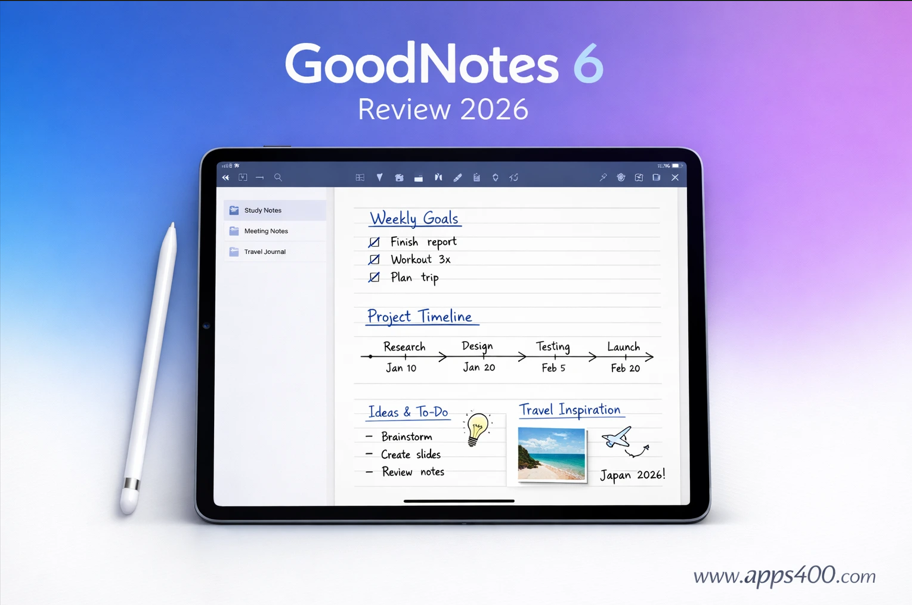
GoodNotes 6 is a note-taking app for iPhone and iPad that combines handwritten notes (with Apple Pencil), typed text, PDF annotation, and organization in one beautiful interface.
Key features: Handwriting recognition (converts your writing to searchable text), PDF annotation and markup, infinite canvas for notes, folders and tagging for organization, iCloud sync across devices, and templates for different note styles.
Download from the App Store. Works on iPhone (though iPad is optimal for handwriting), requires iOS 16.1 or later. Link: GoodNotes 6 on App Store.
Pricing: What Changed in GoodNotes 6
GoodNotes 5 was a one-time $7.99 purchase. GoodNotes 6 changed the model:
Free Version: 3 notebooks limit, basic features, no OCR (handwriting recognition), no folders.
GoodNotes 6 Plus ($9.99/year): Unlimited notebooks, handwriting recognition, folders and tags, custom templates, AI-powered features, math conversion, spellcheck.
Lifetime Upgrade ($29.99 one-time): All Plus features forever, no annual renewal.
The controversy: Long-time GoodNotes 5 users had to pay again for GoodNotes 6. I understand the frustration, but as a new user, $9.99 yearly for unlimited notebooks feels reasonable.
I bought the lifetime upgrade ($29.99) because I plan to use this for years. For students, the yearly plan makes sense (one year of notebooks cost $40+ anyway).
The Note-Taking Experience
Handwriting with Apple Pencil
This is where GoodNotes shines. Writing feels natural, responsive, and smooth. Palm rejection works flawlessly—I rest my hand on the iPad while writing without accidental marks.
Pen options: Fountain pen, ballpoint, brush pen. I use fountain pen for regular notes (smooth, elegant) and brush pen for headers and highlighting.
Colors: Unlimited custom colors or preset palettes. I created a color scheme matching my brand (blue for main notes, orange for important points, gray for side notes).
Handwriting Recognition (OCR)
This feature alone justifies the cost. GoodNotes converts your handwriting to searchable text in real-time.
Real example: I wrote 50 pages of Spanish vocabulary notes. Later, I searched “subjunctive” and GoodNotes instantly showed every page where I wrote that word—even though it was handwritten.
Accuracy: 95% for neat handwriting, 75% for my messy cursive. Still incredibly useful.
PDF Annotation
I import PDF textbooks, articles, and documents for markup. Highlighting, underlining, sticky notes, and drawings all work seamlessly.
Use case: Law school friend uses GoodNotes for case briefs. She highlights key passages, writes margin notes, and creates summary pages—all within the PDF. Searching later pulls up every annotation.
For more productivity tools, check out Apps400’s iPhone apps collection.
Organization: Folders, Tags, and Search
Folder Structure
GoodNotes lets you create unlimited folders and subfolders. My organization:
- Work (client projects, meeting notes)
- Personal (journal, ideas, finances)
- Learning (Spanish, coding, book notes)
Each folder contains multiple notebooks with custom covers.
Tags
Tag individual pages for cross-notebook organization. I tag pages with #actionitem, #review, or #important. Later, I filter by tag to see all action items across every notebook.
Search
The killer feature. Search across all notebooks for handwritten or typed text. I searched “dentist appointment” and found the page from 2 months ago where I jotted the date.
Templates
GoodNotes includes templates: lined paper, graph paper, dotted, planners, calendars. I created a custom daily journal template with prompts (“Today’s wins,” “Tomorrow’s priorities”).
Custom template creation: Design in Keynote/PowerPoint, export as PDF, import to GoodNotes. Endless customization.
What GoodNotes Does Poorly
Problem #1: iPhone Experience is Cramped
GoodNotes works on iPhone, but handwriting on a 6-inch screen is painful. The app is clearly designed for iPad.
Workaround: Use iPhone for quick typed notes or reviewing iPad notes on-the-go. Save handwriting for iPad.
Problem #2: No Collaboration
Unlike Notability (competitor), GoodNotes doesn’t support real-time collaboration. You can’t co-edit a notebook with classmates or colleagues.
Workaround: Export pages as PDF and share via iCloud or email. Not ideal but functional.
Problem #3: No Audio Recording
Notability lets you record audio while taking notes (lectures, meetings). GoodNotes doesn’t. For students recording lectures, this is a dealbreaker.
Alternative: Record with Voice Memos app separately, though you lose the note-audio sync Notability offers.
Problem #4: Limited Export Options
You can export as PDF or image, but not as editable text (even with OCR). If you want to convert handwritten notes to a Word document, you’ll need to copy-paste through the search feature.
GoodNotes 6 vs Notability
I tested both for 2 weeks:
GoodNotes wins: Better handwriting feel, superior organization, infinite canvas (Notability limits vertical scrolling), more stable (Notability has had bugs).
Notability wins: Audio recording synced to notes, real-time collaboration, simpler interface (easier for beginners).
For students attending lectures: Notability. For everyone else: GoodNotes.
GoodNotes 6 vs Apple Notes
Apple Notes (free, pre-installed) added handwriting in recent years. Why pay for GoodNotes?
Apple Notes advantages: Free, simpler, built into iOS ecosystem.
GoodNotes advantages: Infinite canvas (Apple Notes has limited space), better PDF annotation, handwriting recognition actually works, superior organization with folders/tags/search, custom templates.
If you take 5 handwritten notes monthly, use Apple Notes. If you’re a student, professional, or avid note-taker, GoodNotes is worth every penny.
My 4-Month Results
Notes created: 547 pages across 12 notebooks PDFs annotated: 43 documents (textbooks, articles, contracts) Handwritten words: ~50,000 (estimated via OCR) Paper notebooks used: 0 Money saved: $40 (would’ve bought 3 physical notebooks)
Most valuable benefit: Searchability. Finding old notes in paper notebooks took 10-15 minutes. In GoodNotes? 5 seconds.
Should You Buy GoodNotes 6?
Buy GoodNotes 6 if:
✅ You own an iPad and Apple Pencil
✅ You take handwritten notes regularly (students, professionals)
✅ You annotate PDFs frequently
✅ You want searchable handwritten notes
✅ Organization matters to you
Skip GoodNotes 6 if:
❌ You don’t own an iPad (iPhone-only experience is poor)
❌ You rarely take notes
❌ You prefer typing over handwriting
❌ You need collaboration features
❌ You record audio during note-taking (get Notability)
My Rating: 4.6/5 Stars
Pros:
- Best handwriting experience on iPad
- Excellent handwriting recognition (OCR)
- Powerful organization (folders, tags, search)
- Beautiful interface
- Infinite canvas
- PDF annotation works flawlessly
Cons:
- Subscription model annoys long-time users
- No collaboration features
- iPhone experience is suboptimal
- No audio recording
- Pricing could be clearer