If you’ve ever needed to save a text conversation – really save it, not just scroll through it or take a dozen messy screenshots – you already know how frustrating the process can be. Whether you’re building a paper trail for a legal dispute, trying to preserve messages from a loved one before upgrading phones, or documenting a workplace situation, iPhones simply weren’t designed to make exporting messages easy.
That’s exactly the gap TextPort fills.
In this review, we’ll cover what TextPort actually does, who it’s built for, how it compares to desktop alternatives like iMazing or Decipher TextMessage, and whether it’s worth your time. Spoiler: if you need clean, timestamped message records without sitting down at a computer, it’s one of the best tools available right now.
What Is TextPort?

TextPort (available on the App Store as “TextPort: Text Message Export”) is an iPhone app that lets you turn your message conversations into structured, searchable, print-ready PDF files – directly from your phone.
The key distinction: TextPort works through a screen recording or screenshot-based transcription workflow. You capture the conversation on your iPhone screen, and TextPort processes it into a clean document with timestamps, sender names, and the full message thread. No cables. No desktop software. No hour-long backup process.
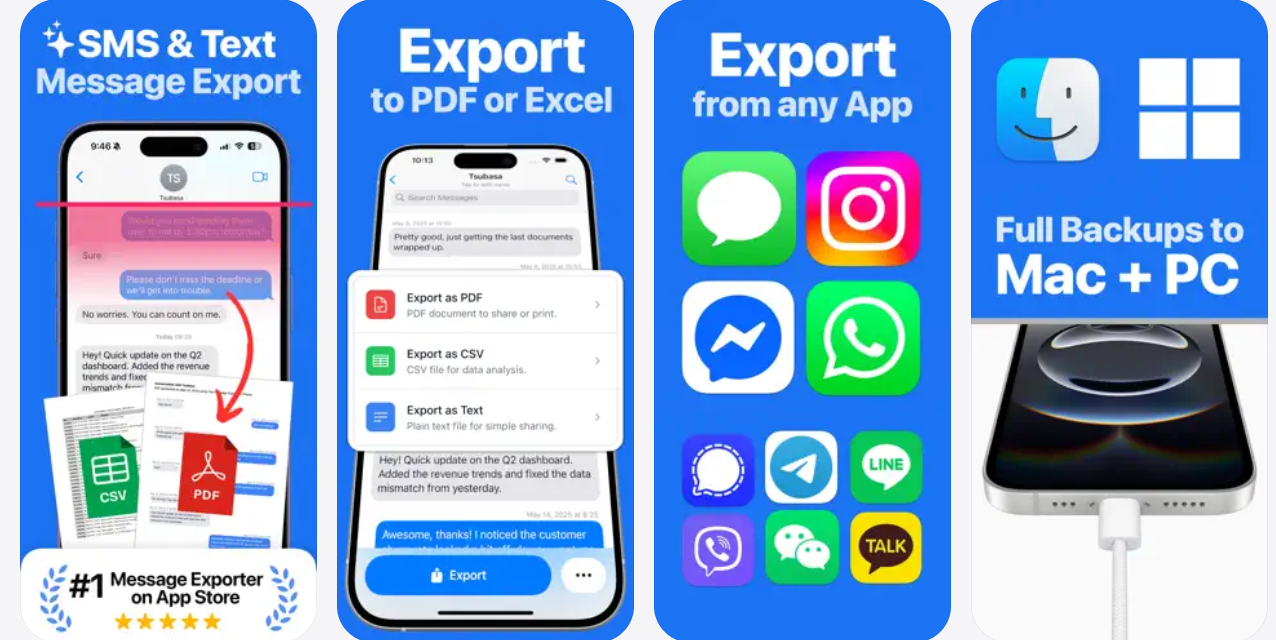
It works with virtually any messaging app – iMessage, SMS, WhatsApp, Messenger, Instagram DMs, Telegram, and more.
TextPort is an iPhone app that converts screen recordings or screenshots of text message conversations into timestamped PDF or CSV files, suitable for personal archives, legal documentation, and record-keeping. It requires no computer connection and can produce a clean export in minutes.
Who Is TextPort Actually For?
There are two main groups of people who really benefit from this app. If you fall into either of these, TextPort was made for you.
1. People in Legal or Formal Situations
This is probably the most urgent use case. If you’re dealing with any of the following, you’ve likely already realized that screenshots are not a reliable solution:
- Custody disputes or family court proceedings – Documenting communication patterns with a co-parent over months requires a full, verifiable, readable record – not 200 scattered screenshots.
- Harassment reports – Whether you’re filing with HR, a school administrator, or law enforcement, a clean timestamped document is far more useful than blurry image files.
- Workplace or landlord disputes – “He said, she said” situations become much clearer when you have a chronological, formatted record of every message exchanged.
- Small claims court or mediation – Many small claims cases hinge on agreements or disputes that happened over text. A readable PDF carries more weight than trying to scroll through a phone screen in front of a mediator.
- Attorney review – Lawyers often request message histories for case evaluation. A well-formatted PDF is far easier (and cheaper) to review than a stack of screenshots.
The challenge with screenshots isn’t just that they’re messy. It’s that they’re fragmented, hard to organize chronologically, impossible to search, and often miss messages at the edge of the screen. TextPort solves all of that by producing one continuous, timestamped document.
Note: TextPort’s output is intended for personal organization and attorney review. Consult with a legal professional about what constitutes admissible evidence in your specific jurisdiction.
2. People Who Want to Preserve Important Conversations
Not every use case is adversarial. A large portion of TextPort users simply want to hold on to conversations that matter – before something makes them inaccessible.
Common scenarios include:
- Switching phones – Whether you’re moving from iPhone to Android or getting a new device, messages don’t always transfer cleanly. Exporting them beforehand gives you a permanent backup you can open anywhere.
- Losing access to an app or account – If someone blocks you, deactivates an account, or an app shuts down, those messages disappear. A timely export means you keep them.
- Family messages – Texts from a parent, grandparent, or late relative can be genuinely precious. Exporting them into a readable format means you can print them, share them, or simply keep them safe.
- School or childcare communication – Parents often need a running record of communication with teachers, childcare workers, or school administrators. A clean PDF beats trying to find a specific message three years later.
- Agreements made over text – “You said you’d cover rent this month” is much easier to reference in a searchable PDF than by digging through an endless message thread.
The Real Advantage: No Computer Required
Here’s where TextPort genuinely stands out from its competitors.
The most established alternatives for exporting iPhone messages – iMazing and Decipher TextMessage – are both solid desktop applications. But they require:
- A computer (Mac or Windows)
- A USB cable or Wi-Fi sync to connect your iPhone
- A full device backup (which can take 30 minutes to 2+ hours, depending on how much is on your phone)
- Additional time to find, filter, and export the specific conversations you actually want
For many people, this is a significant barrier. You might not have a computer handy, the backup might fail, the software might not recognize your device, or you simply don’t have two hours to get this done tonight.
TextPort skips all of that.
The workflow looks like this:
- Open the conversation on your iPhone
- Start a screen recording (built into iOS)
- Scroll through the conversation while recording
- Import the recording into TextPort
- TextPort transcribes it and generates a clean PDF
The whole process – from opening the app to downloading your PDF – can be done in under 10 minutes for most conversations. That’s not a marketing claim; that’s just what the technology allows when you remove the computer from the equation.
For someone who needs to send a message thread to their attorney before a meeting tomorrow, or who wants to archive a conversation before their phone dies or gets reset, that speed difference is everything.
Key Features
Here’s a practical breakdown of what TextPort offers:
Universal messaging app support – Works with iMessage, SMS, WhatsApp, Messenger, Instagram DMs, Telegram, and other apps. If you can record your screen while scrolling through it, TextPort can process it.
Export to PDF, CSV, or plain text – PDF is the most commonly used format for documentation and printing. CSV is useful if you want to import message data into a spreadsheet. Plain text is handy for quick analysis or pasting elsewhere.
Timestamped records – Each message is exported with its corresponding date and time, which is essential for any documentation that needs to show a chronological sequence.
Editable transcription – If a message is misread during the transcription process, you can correct it before exporting. This is useful for fixing names, abbreviations, or messages that were partially obscured.
No limits on export size – You’re not capped at a certain number of messages or conversations. Export as much as you need.
Multilingual support – TextPort supports 22+ languages, making it accessible for non-English speakers in many regions.
4.3 stars on the App Store – Rated by over 700 users, with strong positive feedback particularly from people using it for documentation and archiving purposes.
How TextPort Compares to Desktop Alternatives
| Feature | TextPort | iMazing | Decipher TextMessage |
| Computer required | No | Yes | Yes |
| Export time (typical) | ~5–10 min | 30 min – 2+ hours | 30 min – 2+ hours |
| Works with WhatsApp/Messenger | Yes | Limited | Limited |
| Export to PDF | Yes | Yes | Yes |
| Works on iPhone only | Yes | Mac/Windows | Windows |
| Price model | Subscription | One-time / annual | One-time |
| Available on App Store | Yes | No | No |
The tradeoff is real: iMazing and Decipher offer deeper access to native iMessage backups because they connect directly to your device. If you need to export years of native SMS/iMessage history with full metadata, those tools have advantages. But for most people who need a fast, readable PDF of a specific conversation – especially across third-party apps like WhatsApp – TextPort is simply faster and more practical.
What does TextPort cost? TextPort is free to download with in-app subscription options. Plans include weekly and annual subscriptions, with an annual option available for regular users.
Does it work on iPad? TextPort is designed for iPhone. Check the App Store listing for current iPad compatibility.
What Real Users Are Saying
App Store reviews paint a clear picture of the people finding TextPort most useful.
One user noted the app is “probably the most useful app I have,” specifically citing how useful it is for documenting message threads for reference and the ability to correct any transcription errors before exporting.
Others highlight how much time it saves compared to managing photos of message threads – a common workaround that results in disorganized files you can’t search or easily share.
The developer is also notably active in responding to user feedback and pushing regular updates – the app has received multiple version updates in 2025 and 2026, with fixes and improvements shipped consistently.
The Bottom Line
TextPort isn’t trying to be everything to everyone. It does one thing – turns your message conversations into clean, organized, shareable documents – and it does it faster and more conveniently than any alternative that requires a desktop setup.
If you’re in a legal situation and need to hand your attorney a readable, timestamped record of a conversation tonight, TextPort delivers that in minutes. If you want to preserve years of family messages before switching phones, it gives you a portable PDF you can save, print, and keep forever. If you’re somewhere between those scenarios – trying to document a workplace situation, save an agreement made over text, or simply organize important communication – it’s a genuinely practical tool.
The speed advantage over desktop alternatives like iMazing or Decipher TextMessage is real, measurable, and meaningful for anyone who doesn’t have a computer handy or doesn’t want to invest hours in a full device backup just to get one conversation out.
For iPhone users who need message exports done quickly, without technical setup, and in a clean readable format – TextPort is the most straightforward solution available on the App Store today.
Download TextPort on the App Store →