The UI design tool landscape in 2026 has largely consolidated around Figma as the industry standard – but Adobe XD still carries a significant user base, particularly among teams deeply embedded in the Adobe Creative Cloud ecosystem. The two tools have diverged in meaningful ways over the past two years, and understanding exactly where each leads and where each falls short is more important now than at any previous point in this comparison. This review tests both tools across real design workflows to give a clear, honest picture of what each delivers in 2026.
Where Figma Clearly Leads in 2026
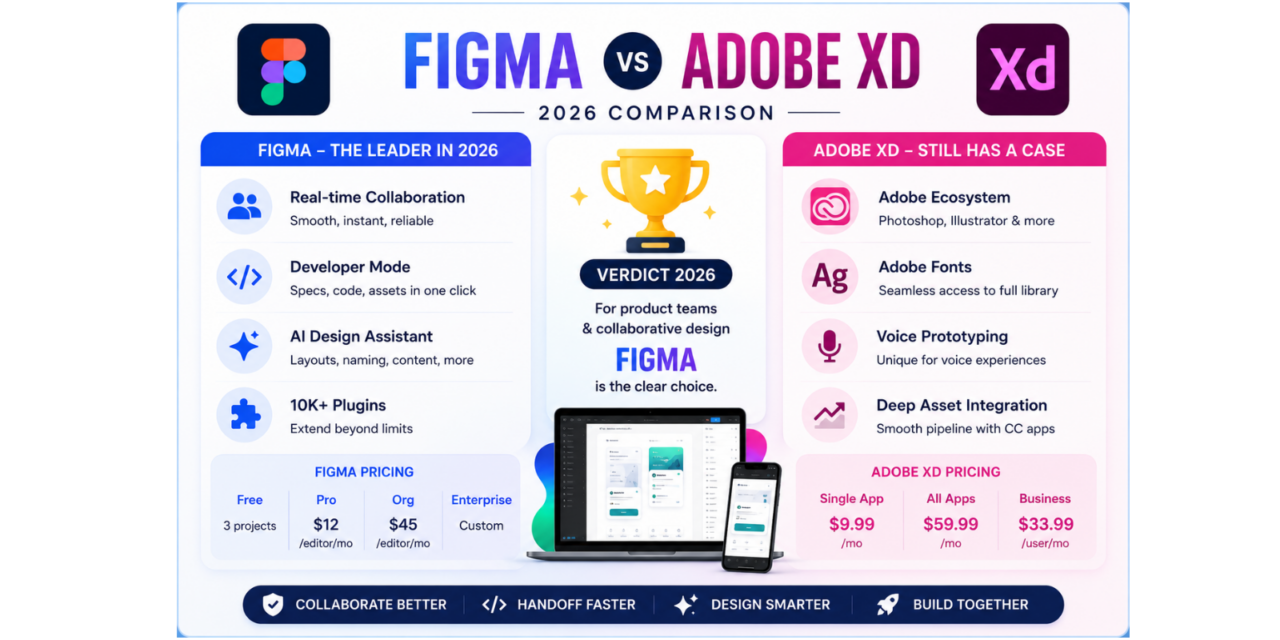
Real-time multi-user collaboration is Figma’s defining advantage and it remains unmatched in 2026. Multiple designers can work on the same file simultaneously with live cursor presence, instant synchronisation of every change, and inline comment threads attached to specific design elements. For remote and distributed product teams, this is not a feature – it is the foundation of how collaborative design work happens.
Developer Mode is the most impactful addition for improving design-to-engineering handoff. When a frame is marked as ready for development, engineers access a read-only view where clicking any element instantly shows exact dimensions, spacing, colours, font specifications, and generated code in CSS, iOS Swift, or Android Kotlin. The elimination of the manual spec sheet that designers previously had to maintain separately is a genuine workflow improvement that teams report saves hours per sprint.
The AI layout assistant available broadly in 2026 generates wireframe component structures from text descriptions, renames layers semantically rather than leaving them as Rectangle 47, and suggests auto-layout configurations that match the described component structure. The plugin ecosystem – over ten thousand community contributions covering accessibility auditing, content population, icon libraries, and animation tools – extends the native capabilities significantly.
Figma Pricing in 2026
- Figma Free – three projects, unlimited collaborators in view-only mode, full community plugin access, excellent for freelancers and students evaluating the tool
- Figma Professional – twelve dollars per editor per month, unlimited projects, full version history, unlimited team libraries
- Figma Organisation – forty-five dollars per editor per month, SSO, centralised team management, advanced analytics
- Figma Enterprise – custom pricing, maximum security controls and compliance features for regulated industries
Start free at www.figma.com. Desktop app for Mac and Windows available at www.figma.com/downloads.
Where Adobe XD Still Has a Case
Adobe XD’s strongest argument in 2026 is its integration with the Adobe Creative Cloud ecosystem. For teams using Photoshop, Illustrator, After Effects, and Adobe Fonts as daily tools, the asset sharing pipeline between these applications and XD is seamless in a way that requires explicit import/export steps when using Figma alongside the same Adobe tools.
Adobe Fonts integration in XD is particularly smooth – the full Adobe Fonts library is available without additional setup, while Figma’s font integration requires fonts to be installed locally or managed separately. For teams whose work involves custom typography from the Adobe Fonts catalogue, this is a genuine convenience advantage.
XD’s voice prototyping features – adding speech commands and responses to interactive prototypes – are unique in the design tool market and make it the preferred choice for teams designing voice-interface experiences where spoken interaction needs to be communicated to stakeholders through a prototype.
Where Adobe XD Falls Short in 2026
The pace of Adobe XD feature development has slowed visibly compared to Figma’s release cadence. Adobe’s public communications and product roadmap in 2025 and 2026 have emphasised Adobe Express, Adobe Firefly AI image generation, and Acrobat AI tools more heavily than XD development. This has created genuine uncertainty among XD users about the long-term trajectory of the product.
The developer handoff in XD relies on the Adobe Publish feature and Design Spec view, which lacks the polish and interactivity of Figma’s Developer Mode. Engineers interacting with XD specs consistently report that the experience is less efficient than Figma’s implementation, requiring more back-and-forth communication to resolve specification questions.
Real-time collaboration in XD exists but does not match Figma’s implementation in fluidity or reliability. Users of both platforms who have worked in collaborative sessions on both report that Figma feels noticeably smoother for multi-user editing, with fewer sync conflicts and more predictable behaviour when multiple people are editing the same component simultaneously.
The AI Comparison
Figma’s AI features in 2026 are integrated throughout the core product – layout generation, semantic naming, content population, and prototype interaction suggestions are all available within the standard editing workflow. Adobe’s AI story in 2026 centres on Firefly, which is primarily positioned as an image generation tool and is not as deeply integrated into the XD design workflow.
Adobe’s longer-term AI roadmap for Creative Cloud is ambitious and Firefly’s image generation quality is genuinely impressive for creative work. But for the specific AI features relevant to UI design workflow – component generation, specification assistance, and design system enforcement – Figma’s 2026 implementation is more directly useful for product designers.
The Verdict for 2026
For product designers, UX designers, and teams building digital interfaces in a collaborative environment: Figma is the clear choice in 2026. The collaboration features, Developer Mode, plugin ecosystem, and AI integration all point in the same direction, and the pace of improvement suggests this gap will widen rather than narrow in coming years.
Adobe XD makes genuine sense for teams fully invested in the Adobe Creative Cloud ecosystem who work frequently with Adobe Fonts and require seamless Photoshop and Illustrator asset pipelines. For these teams, the switching cost to Figma may not be justified by the capability difference alone.
For any team starting fresh with no existing tool investment: Figma should be the default choice without reservation.