For more than ten years, app store optimization on Google Play followed a familiar plan. You picked the right keywords, put them in your title and description, made attractive screenshots, and worked your way up the rankings. In 2026 that plan still matters, but it isn’t enough anymore.
At Google I/O 2026, Google added Gemini to almost every part of how people find apps. Users can now ask the Play Store questions in plain language, get AI-written summaries of search results, and even find and install Android apps straight from the Gemini app without opening Google Play. If you’re an Android developer, the people discovering your app are increasingly reaching it through a language model, not a keyword box.
This guide covers what changed, how AI-led discovery works, and the practical steps for app store optimization in 2026.
What Changed in Google Play Discovery in 2026
Ask Play: Conversational Search Inside the Store
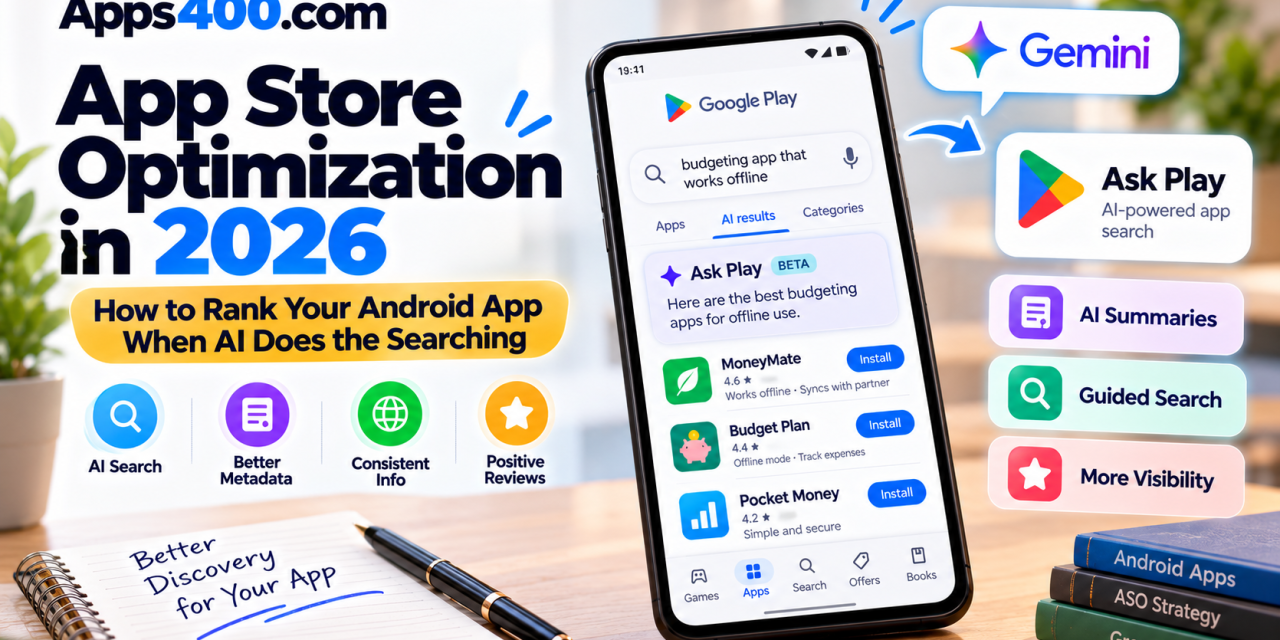
The biggest change is Ask Play, a Gemini-powered conversational search experience inside Google Play. Users can ask a full question, like “a budgeting app that works offline and syncs with my partner,” and get an answer instead of typing “budget app” and scrolling. Google says Ask Play understands the full context of what the user is asking.
Alongside it come Ask Play highlights: AI-generated summaries that sit at the top of search results pages. According to ASO platform AppTweak’s analysis of the I/O rollout, Ask Play also draws on your store description, key features, and your app’s website when it answers questions about your app. That works for apps the user hasn’t installed yet, too.
Guided Search and AI Listicles
For broad queries, Google Play now offers guided search, which suggests narrower sub-queries. For example, a search for “fighting games” might suggest “arcade fighting games.” These journeys often show AI-generated listicles and highlight cards built from your metadata and user reviews.
AppTweak notes that AI-generated modules can now take up the first few screens of some search results, which pushes traditional organic listings further down. If your strategy depends only on keyword rank, you may be “ranking” somewhere users never scroll to.
Gemini as a Discovery Surface Outside the Store
Google also announced that app discovery is coming to the Gemini app on Android and the web. Users can ask Gemini for an app recommendation and act on it without ever opening the Play Store. Google said that later this year, discovery will expand to more than 450,000 movies and TV shows, with deep links into the apps that carry them.
Put simply, your store listing is no longer read only by people. A model reads it first, interprets it, and decides whether your app belongs in its answer.
Why Traditional Keyword ASO Isn’t Enough
Keywords haven’t stopped mattering. Your title, short description, and full description are still the main signals Google Play uses to understand what your app does. But their role is shifting from driving traffic directly to signaling relevance.
A language model doesn’t count how many times you repeat “photo editor.” It tries to understand:
- What problem your app solves
- Who it’s for
- What specific features it offers
- How it compares with alternatives
- What real users say about it
A description stuffed with repeated keywords gives Gemini very little to work with. A clear, specific description that answers real user questions gives it plenty.
7 Practical ASO Strategies for the AI Search Era
1. Write Your Full Description for Humans and Models
The full description is still limited to 4,000 characters, and it’s now one of your most important assets for AI. Structure it like a well-organized help article:
- Open with one or two sentences that say plainly what the app does and who it’s for.
- Use short sections for core features, each with a concrete benefit.
- Name specific capabilities: “works offline,” “exports to PDF,” “supports Wear OS,” “no account required.”
- Answer the questions users actually ask, such as pricing, privacy, supported devices, and languages.
Specific, factual statements are much easier for an AI to quote back to a user than vague marketing lines like “the ultimate experience.”
2. Keep Your Title and Short Description Tight and Compliant
The basics still apply: a 30-character app title and an 80-character short description. Google Play’s metadata policy also discourages keyword stuffing, along with performance claims and promotional terms like “#1,” “best,” or “free” in the title. Use your title for your brand plus one strong descriptive phrase, and use the short description for your clearest value proposition.
3. Make Your Website and Store Listing Tell the Same Story
Ask Play can pull from your app’s website, so mismatched information between your site and your listing hurts you. If your website says “free for up to 5 users” and your listing says nothing about pricing, the AI has to guess, or skip you.
Audit your landing page, FAQ, and help center. Make sure features, pricing, supported platforms, and positioning match your Play listing. Structured, crawlable FAQ pages are especially valuable.
4. Treat Reviews as Ranking Content
AI highlights and guided-search cards draw on user reviews. That makes your reviews part of your discoverability, not just social proof.
- Ask for reviews at natural moments of success, using the Google Play In-App Review API.
- Reply to negative reviews quickly and specifically, since replies show users and models that you’re actively maintaining the app.
- Fix the problems reviewers mention repeatedly. If “crashes on login” shows up in 30 reviews, an AI summary may surface that theme.
5. Use Custom Store Listings and Gemini-Assisted Tools
Google Play Console now uses Gemini to recommend keywords and generate custom store listings you can deploy in one click. Custom store listings let you tailor your page for specific countries, search keywords, or ad campaigns. Combined with store listing experiments, they’re one of the quickest ways to test which messaging converts.
Google also announced AI-assisted localization: you can upload structured files (such as CSV or Google Sheets) so Gemini can pre-fill your listings across languages. That’s a big time-saver for small teams expanding internationally. Still, have a native speaker review the most important markets before publishing.
6. Invest in Video and Visual Assets
Google introduced Play Shorts, a full-screen, portrait, short-form video feed for showing off apps, rolling out first in the US and to select developers. Even if you don’t have access yet, now is the time to produce short, vertical demo clips that show your core feature in the first few seconds. Strong screenshots with readable captions still matter for conversion once a user lands on your listing.
7. Measure Visibility, Not Just Rankings
Google Play Console is adding a Reach metric that shows your total store visibility, plus Gemini-powered chart descriptions and interactive Q&A on performance pages. Use them. When AI modules sit above organic results, keyword rank alone can be misleading. Track store listing visitors, conversion rate, and acquisition sources over time to see whether AI-led surfaces are sending you users.
A Quick ASO Checklist for 2026
Before your next release, run through this list:
-
Title (30 chars) and short description (80 chars) are clear, compliant, and benefit-led
-
Full description opens with a plain-language summary and lists specific features
-
Pricing, privacy, offline support, and device compatibility are stated explicitly
-
Website and FAQ match your store listing
-
Review prompts are triggered at moments of success, and replies go out regularly
-
At least one custom store listing is live for a key market or keyword theme
-
Listings are localized for your top markets and checked by a human
-
A short vertical demo video is ready
-
You’re tracking Reach and conversion in Play Console, not just keyword rank
Keep Regional Rollouts in Mind
Many of these AI features are rolling out in stages. Some are limited to English-language devices or select markets at first, and availability in regions like the EEA may lag behind. If your audience is mostly outside the US, keep traditional keyword optimization strong while preparing your listing for AI search as the features expand.
Conclusion: Write for the Assistant, Win the User
App store optimization in 2026 comes down to one change in thinking: your listing is now a source document for an AI assistant. The developers who win will describe their apps clearly, specifically, and consistently across every surface they own, and back those descriptions with good reviews and a strong product.
Keywords still open the door. Clarity is what gets your app recommended.
Ready to future-proof your app’s visibility? Start by rewriting your full description using the checklist above, then run a store listing experiment to measure the impact. For more Android development guides, app reviews, and AI trends, browse the App Development section on Apps400, and share this guide with your dev team