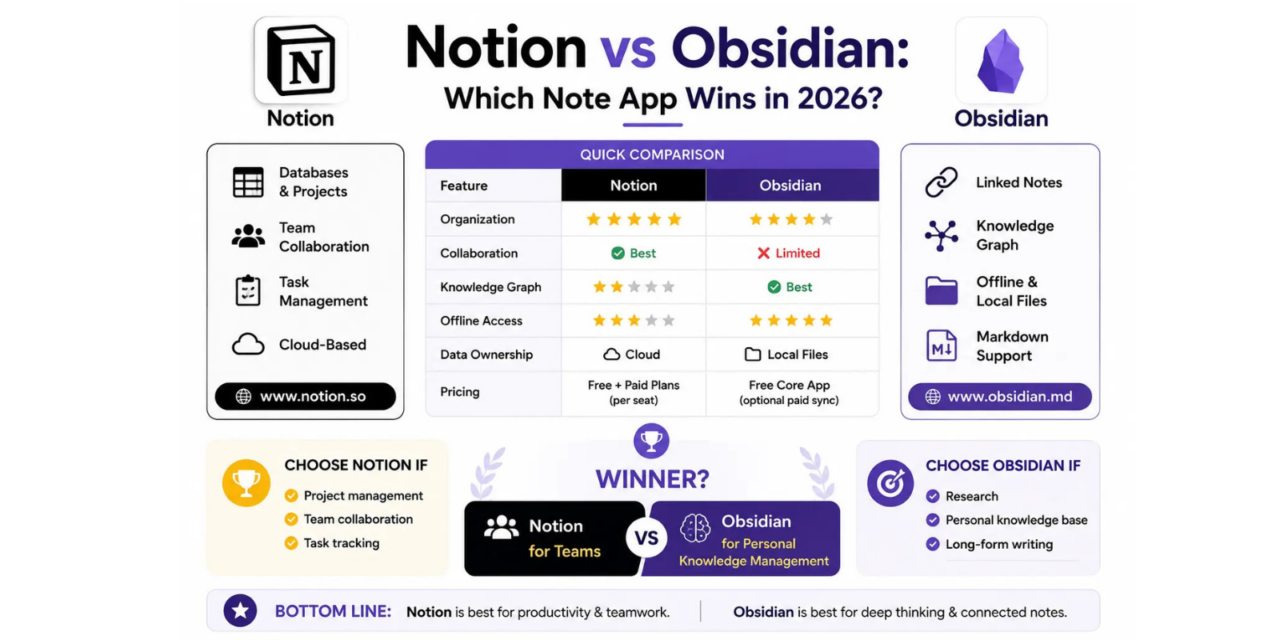
Notion and Obsidian both have passionate followings, and both get recommended constantly as the best note-taking app, which makes the choice more confusing rather than less for anyone trying to pick one. The truth is they’re built around genuinely different philosophies, Notion organizes information into structured databases and pages, while Obsidian treats notes as a web of freely linked ideas stored as plain text files on your own device. Neither approach is objectively superior, but one will almost certainly fit how your brain actually organizes information better than the other. Here’s a genuine breakdown of both in 2026 to help you figure out which side you land on.
Structure and Organization
Notion excels at structured organization, databases, tables, and nested pages make it ideal for project tracking, team wikis, and anything with clear categories and properties. Obsidian instead favors a flatter structure of individual notes connected through links and tags, which suits freeform thinking and idea development better than rigid hierarchies.
🔗 www.notion.so | www.obsidian.md
Linking and Knowledge Graphs
Obsidian’s bidirectional linking and visual graph view are genuinely unmatched for anyone doing research or building a long-term personal knowledge base, letting you see unexpected connections between notes written months apart. Notion supports linking too, but it’s a secondary feature rather than the core design philosophy the entire app is built around.
Collaboration
Notion is dramatically better for team collaboration, with real-time multiplayer editing, comments, and permission controls built in from the ground up. Obsidian’s local-first, plain-text approach makes true real-time collaboration awkward without third-party sync plugins, making it much better suited to solo use than team workflows.
Offline Access and Data Ownership
Obsidian stores notes as plain markdown files on your own device, meaning you fully own your data and can access it offline without any dependency on a server staying online. Notion requires an internet connection for most functionality and stores everything in its own cloud, which some users find limiting if they value full control over their data.
Pricing
Notion’s free tier is generous for individuals, with team plans scaling per seat as you add collaborators. Obsidian’s core app is free even for commercial use, with an optional paid sync and publish service for those who want official cloud backup instead of relying on third-party sync solutions.
So Which One Should You Actually Pick
If your work involves managing projects, collaborating with a team, or tracking things with clear properties like status and due dates, Notion is the more natural fit and will likely save you time you’d otherwise spend fighting Obsidian’s flatter structure into something more rigid. If you’re doing deep research, personal knowledge management, or long-form writing where connecting ideas across time matters more than organizing tasks, Obsidian’s linking system will feel like it was built specifically for that kind of thinking. Plenty of people actually use both, Notion for team and project work, Obsidian for personal notes and research, rather than forcing one tool to do a job it wasn’t really designed for.
Neither app is going anywhere, and both have only gotten more capable over the past few years rather than stagnating, so this isn’t a decision you need to treat as permanent or irreversible. Try building a small, real project in each over a weekend rather than reading more comparisons, the difference in how each app feels to actually use will make the right choice obvious far faster than any review, including this one, ever could.